Owner’s manual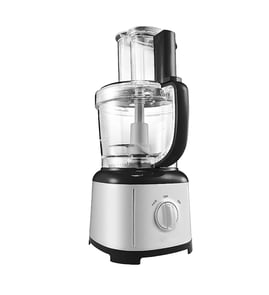



What is the most highly rated food processor?
Highly rated food processors vary by reviewer and what you cook most, but for a large-capacity, premium pick, the Breville Sous Chef 12 is commonly rated at the top. If you already own the KitchenAid KFP1642MS0 16-cup food processor, you can get “like-new” performance by using the right accessories and following the KFP1642MS0 owner's manual for setup, fill limits, and safe operation.
What “most highly rated” usually means
Ratings typically reward a mix of performance, durability, and ease of use. For 12 to 16-cup machines, reviewers usually focus on:
- Motor strength and consistency under load
- Bowl capacity and usable fill limits (especially for liquids)
- Disc and blade results (slicing, shredding, chopping)
- Ease of assembly, lid locking, and cleanup
- Storage and accessory organization
How to get top-tier results from your KitchenAid KFP1642MS0
KitchenAid’s own guidance helps you avoid common performance complaints (uneven slicing, smearing cheese, leaks, and stalling).
- Lock the bowl and lid fully; the processor will not run unless they’re aligned and locked
- Follow the bowl’s max liquid level graphics for thick vs. thin liquids
- For chopping, keep the work bowl about 1/3 to 1/2 full for better circulation
- Use light pressure for soft foods and firmer pressure for hard foods when slicing/shredding
- Shred only well-chilled cheese to reduce smearing
Quick “best use” guide
| Task | What works best | Tip that improves results |
|---|---|---|
| Chopping | Multipurpose blade | Keep bowl 1/3 to 1/2 full |
| Slicing | Slicing disc | Use steady, appropriate pressure |
| Shredding | Shredder disc | Chill cheese first |
| Liquids | Work bowl fill lines | Do not exceed max levels |
When a “highly rated” processor still disappoints
Most “it won’t run” complaints come down to safety interlocks and assembly.
- Confirm the bowl and lid are properly aligned and locked
- Make sure the large food pusher is inserted in the feed tube
- Check that food is not above the max fill line in the feed tube
- Verify the outlet and household circuit are working
Why it matters
A top-rated food processor is only as good as its setup and technique. Using the correct fill levels, pressure, and accessories improves texture, reduces strain on the motor, and helps prevent leaks and stalling.
Last updated: January 2026
What should you not put in a food processor?
For the KitchenAid KFP1642MS0 16-cup food processor, avoid foods and tasks that the machine is not designed to handle, especially very hard items and “liquefying” jobs. These can dull blades, strain the motor, or prevent safe operation; follow the limits in the KFP1642MS0 owner's manual.
Foods and tasks to avoid
KitchenAid lists several functions this food processor is not designed to do:
- Grind coffee beans, grains, or hard spices
- Grind bones or other inedible parts of food
- Liquefy raw fruits or vegetables (use a blender for smoothies)
- Slice hard-cooked eggs
- Slice unchilled meats
Other common “don’ts” that help prevent damage
These are practical limits that protect the bowl, discs, and drive system during everyday use:
- Do not overfill the feed tube; keep food below the max fill line
- Do not run the unit unless the bowl and lid are aligned and locked
- Do not use hands or utensils near moving blades or discs; use the food pusher
- Do not process extremely hot liquids (heat and steam can create a messy, unsafe situation)
Quick guide: use a food processor vs. another tool
| If you need to… | Best tool | Why |
|---|---|---|
| Chop, shred, slice firm foods | Food processor | Designed for discs and pulsing control |
| Make smoothies or “drinkable” blends | Blender | Food processors are not meant to liquefy raw produce |
| Grind hard spices or coffee beans | Grinder | Hard grinding loads can strain the drive and dull edges |
Why it matters
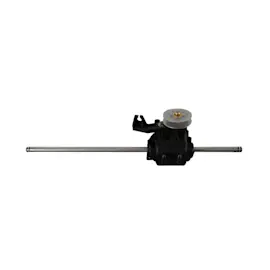
Hard grinding and liquefying tasks create high resistance and heat, which can shorten motor life and wear the drive components. If the unit struggles, stops, or won’t start, checking the lid interlock and drive system is a smart next step; the food processor drive gear assembly W10895825 is one of the key parts that transfers motor power to the blade/disc.
Last updated: January 2026
Can you replace food processor blades?
Yes. On the KitchenAid KFP1642MS0 16-cup food processor, blades and discs are designed to be removable for cleaning and storage, so replacing a dull, bent, or chipped blade is the right fix for poor cutting performance and safer than trying to force results with a damaged edge. See the KFP1642MS0 owner's manual for the correct removal and handling steps.
When to replace the blade (not sharpen it)
Replace the blade if you notice any of the following:
- Chipping, cracks, or a bent tip
- The processor tears food instead of cutting cleanly
- Excess vibration or rattling when the blade is installed
- The blade no longer locks securely onto the power shaft
- You see damage around the blade’s seal area (if equipped)
Safe removal and installation basics
Blades are sharp, and the manual calls out keeping hands away from moving blades and handling blades carefully.
- Unplug the food processor before disassembling
- Remove the lid first, then pull the blade straight up to remove it
- When installing, press down firmly until you hear/feel it click into place
- Never place a cutting blade on the base without the bowl properly installed
- Store blades and discs in the storage case and out of children’s reach
Which replacement part should I order?
For this model, we list multiple blade and disc accessories. Match the replacement to the accessory you use most.
| Accessory type | What it’s used for | Example part for KFP1642MS0 |
|---|---|---|
| Multipurpose blade | Chopping, mixing, pureeing | Blade WPW10597678 |
| Alternate blade (model-specific) | Some kits include a second blade style | Blade WPW10592813 |
| Slicing disc | Slicing vegetables, fruit, cheese | Disc slicer WPW10597690 |
Why it matters
A damaged or dull blade makes the motor work harder, can cause inconsistent results, and increases the chance of slips during handling. Replacing the blade restores performance and helps protect the bowl, lid, and drive components.
Last updated: January 2026
What is the life expectancy of a food processor?
A food processor typically lasts 7 to 10 years with normal home use. For a KitchenAid 16-cup food processor like model KFP1642MS0, consistent cleaning, correct assembly (bowl and lid locked), and avoiding overloads are the biggest factors that help it reach or exceed that range; see the KFP1642MS0 owner's manual for use limits and care.
Typical lifespan (what we see most often)
Most full-size food processors fall into these ranges:
- Budget/light-duty units: about 5 to 6 years
- Midrange units: about 7 to 10 years
- Heavier-duty/premium units: often 10+ years with good care
Quick comparison
| Usage pattern | Typical lifespan | What shortens it most |
|---|---|---|
| Occasional (weekly) | 8 to 12 years | Storage damage, dull blades |
| Regular (several times/week) | 7 to 10 years | Overfilling, overheating |
| Heavy (daily, large batches) | 5 to 8 years | Motor strain, worn drive parts |
How to make your KFP1642MS0 last longer
These habits prevent the most common failures (motor strain, cracked plastic, and drive wear):
- Lock the bowl and lid fully before starting; the unit is designed not to run unless assembled correctly.
- Stay under max fill lines and avoid forcing dense mixtures.
- Avoid prohibited tasks such as grinding coffee beans, grains, or hard spices (these can overload the drive).
- Unplug before cleaning and keep the base out of water to protect electrical components.
- Stop if performance changes (slower speed, burning smell, unusual noise) and inspect for wear.
Signs it is nearing end of life
If you see these symptoms repeatedly, it is usually time to service or replace a worn part:
- Motor runs but the blade does not spin consistently
- Unit only runs when you press down or wiggle the lid
- Loud grinding or clicking from the base
- Cracked bowl, lid, or leaking around seals
Parts that commonly wear first
| Symptom | Common area | Example part for this model |
|---|---|---|
| Intermittent power or no start | Controls/electrical | Food processor speed control switch W10597644 |
| Grinding noise, poor drive | Drive/gear train | Food processor drive gear assembly W10895825 |
| Weak start or humming | Motor start circuit | Capacitor W10597666 |
Why it matters
A food processor that is overloaded or assembled incorrectly can trip safety interlocks, strain the motor, and wear the drive system faster. Following the operating and cleaning guidance in the KFP1642MS0 owner's manual helps protect the motor, gearbox, and bowl components.
Last updated: January 2026